Motorola DCT3416 HDTV Cable Box and HDTV DVR
My Motorola DCT5100 died a few months back and I took the opportunity to go ahead and upgrade my Comcast package to include a DVR. When the installer came out he brought with him my shiny new box which happened to be a Motorola DCT3416. Of course I seemed to know more about installing the thing than the installer did and after a bit we finally got everything hooked up and working great. Like the old cable box page you may be wondering why I bother making a page about my cable box. The answer is simple, HDTV. If you haven’t jumped on to the HDTV bandwagon yet I highly suggest it. If your cable company offers HDTV take the plunge and order it (assuming you have a TV that can display HDTV, and if you don’t upgrade). HDTV simply looks amazing, if you think DVDs look good you are going to be absolutely blown away by HDTV. I realize that by now most people have seen HDTV so I may be preaching to the choir here but do yourself a favor and call your cable company and get yourself some HDTV.
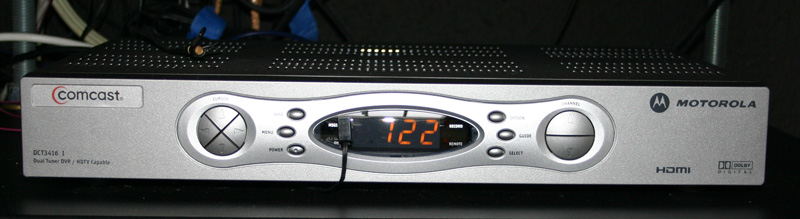
The Motorola DCT3416 looks almost exactly like the Motorola DCT5100 that it replaced. It functions in the same way as well for the most part. It just has the DVR qualities which are nice. The 3416 has a 160 gig hard drive in it. I am currently recording 24 on it, I haven’t watch a single episode, I want to watch them all back to back and not have to wait. I have watched all the previous seasons on DVD and I can’t imagine having to wait a week to find out. Anyway, with the 160 gig hard drive I have around ~20 episodes of 24 recorded and they DVR is about 90% full. I am of course recording in HD. So, I should be able to fit 24 hours worth of programming on the DCT3416 but it’s going to be close. That should give you a good estimate though of how much HD material you can record, I would say somewhere between 22-26 hours would be a good guess.
For those of you familiar with my home theater setup you will know that I have a HTPC that allows me to record OTA HDTV and I have SageTV that allows me to record standard definition. Ever since I got the DCT3416 I have not used my HTPC for the recording of anything. While Sage worked ok for recording it was a bit flaky at times and just not as easy to use as this is. I actually just had to reinstall windows on my HTPC and I didn’t even bother installing Sage. I very rarely recorded HDTV with MyHDTV in the first place but now I doubt I ever will again. There is one advantage to recording with both MyHDTV and Sage though, you automatically have a copy in an easy to use format on the computer, the same can’t be said for recording with the Motorola DCT3416 unfortunately.
I have been very happy with the DCT3416 DVR, I love being able to record things easily in HD, I love being able to pause live TV, I love being able to rewind to a missed line, I love being being able to skip through commercials on recorded shows, overall I just love it and it has changed the way I watch TV.
I wrote a little guide on how to add a 30 second skip feature to your remote. This little hack is very safe and I absolutely love it. Check it out. Add a 30 second skip to your cable box.
Motorola DCT3416 HDTV DVR Cable Box Features
- Supports standard-definition (SDTV),enhanced-definition (EDTV), and high-definition (HDTV) television
- Out-of-band (OOB) data receiver
- Integrated DOCSIS-compliant 2.0 cable modem
- IR Blaster port
- On-screen diagnostics
- Dolby® Digital, Pro Logic, and stereo audio
- Digital Video Recording (DVR)
- Video On Demand (VOD) programming
- Macrovision copy protection
- DES-based encryption
- DigiCipher II access control
- Pass-through of VBI data services (closed caption,V-chip, and CGMS-A)
- USB 2.0
- HDMI digital audio/video interface (replaces DVI)
- SATA connector (provides additional DVR capacity with an external hard drive)
- IEEE 1394
- 160 gig hard drive
Filed Under Equipment | 45 Questions/Comments |
Comments & Questions
If you would like to make a comment, or ask me a question, please fill out the form below.
If you want a personalized image to appear with your comment you need a Gravatar.
Sign up for a Gravatar today. It's free and easy
September 24, 2009 1:30 am
how do I make the picture in picture work with the Motorola DCT3416I. when I push the on button nothing happens.
help
September 24, 2009 3:25 am
The DCT3416 doesn’t do PIP. Motorola uses the same remote for all/most of their boxes which is why the buttons are on your remote.
September 25, 2009 2:49 pm
Regarding your reply to Eric, you say the DCT3416 does not support PIP. Why then do you have in your features list as “HD Picture-in-Picture capable”?
You might want to revise your list.
September 25, 2009 3:22 pm
I got the specs directly off of the Motorola website, apparently Motorola likes to brag about their boxes supporting stuff that they don’t actually support. I’ve removed the PIP from the specs on the site.
November 5, 2009 1:56 pm
I have the Motorola DCT3416I also.
I have some Speed TV programing on the DVR that I would like to copy to a DVD, only because my son was a crew member on a race team that got good camera coverage in the pit sequence.
I purchased a Panasonic model DMR EA18 DVD recorder and attempted to copy the action but I only got video, no audio.
November 5, 2009 2:07 pm
Sorry, I have no experience pulling recordings off the cable box. You may be able to make your life a lot easier and see if you can find a torrent of the show and just download it.
December 6, 2009 6:33 am
Can I add an external hard drive to my dct3416 to increase it’s recording capability?
December 6, 2009 10:37 am
Alan, last I knew you could not add an external hard drive.
December 31, 2009 6:24 pm
Yes, the DCT3416 (NOW) allows you the option of adding an external (eSata) hard drive. Firmware was recently updated to allow this feature.
December 31, 2009 7:24 pm
That’s cool, I wonder if all the cable companies will actually give out the firmware update though.
March 9, 2010 1:15 pm
Is there somewhere to find the firmware upgrade? I searched google to no avail? Thanks!
March 9, 2010 2:25 pm
As far as I know, firmware updates are done by the cable company. They can do them remotely.
March 21, 2010 9:58 pm
Using 3416 from Comcast. I set a record once yesterday for the period 12noon to 6 PM today for channel 116. There was also a scheduled program that happened to start at 12:30 for channel 119. Today I only had the 17 minutes of the channel 119 program recorded. Should I have left the 3416 on to get the channel 116 program? I usually use the remote to turn off the TV and the cable box (3416).
April 11, 2010 9:23 am
Can an Infrared Receiver Extender Cable be used with this box? Comcast provided such with their little digital converter boxes recently sent to me. I found such a cable on Amazon but it was stated it would NOT work with the DCT 3416. So, do you know if one exists?
Thank you.
May 17, 2010 6:52 pm
How do I set my Motorola DCT3416 to record a show/use the DVR feature? It came with no directions!!
May 18, 2010 10:37 am
Becky, it should be pretty intuitive to figure out how to set up recordings. If you can’t figure it out your cable company may have some onDemand videos that explain it. If not, call your cable company and ask them to send you some literature.
June 23, 2010 9:35 am
I have FIOS with the DVR HD box Motorola QIP6416-2. The box is in a spot where I could use an IR extender for more convenient use. Does such a thing exist and do you know where is can be obtained?
thank you
Marty Harrington 805-375-3845
June 23, 2010 9:53 am
Mark, http://moesrealm.com/home-theater/equipment/hot-link-pro-ir-distribution/
July 11, 2010 10:03 am
I have a Motorola QIP6416-2 box with my FIOS but I need instructions to hook-up a DVD player. Can someone help, please
October 28, 2010 7:46 pm
How can one change the time on the display of the pvr 3416?
November 7, 2010 8:46 am
I dont think this unit has a blaster port.
November 30, 2010 12:04 pm
Lost the operating instructions for a DCT3416 I.
Anyone know wher I can download same (particularly for using the recording capability?
Thanks,
Hal
December 14, 2010 8:31 am
I have a dct3416 and am trying to make the guide full screen without the black lines on both sides is it possible?
December 14, 2010 12:08 pm
Justin, if it is possible, I don’t know how to do it. Sorry.
January 4, 2011 4:09 pm
If I take the DCH 3416 from the house and put it in the motorhome and turn it on and hook up the cable, the DVR works even if I disconnect the cable. It works as long as I don’t turn off the power. Somehow I turned off the power on the road and now the DVR won’t work and I can’t connect to the Time Warner to restart it. Is there way to get just use the DVR to work without jump starting it with the cable?
January 5, 2011 12:41 pm
Dave Broadbent, sorry, but I have no idea on how to do that.
Good luck.
January 7, 2011 11:40 am
Where can I get a replacement remote? The power on/off no longer works on mine, however all other functions work fine.
January 7, 2011 11:43 am
Jim, I’d call your cable company and ask for a replacement. If that’s not an option, eBay.
January 21, 2011 6:38 pm
I need a booklet or owners guide to read. In order to operate your HD recorder dct3416! They did not leave me one.
Thank you! Robert Meryhew
June 6, 2011 2:44 pm
I have a (Verizon FIOS) Motorola HD/DVR QIP6416-2 that just bit the dust. Keeps switching itself off & on every 2mins.
Verizon is going to send me another unit but I have weeks worth of recorded programming that I will loose! Is there a way to pull this off onto a portable HD or Laptop Computer? I have a MacBook Pro in case that is helpful to know.
Verizon tells me the ports are disabled but the guys I spoke with say there is no way to pull info off.
The unit has a USB-2 port on the front, two IEEE 1394’s, another USB-2 port, an Ethernet and HDMI on the rear.
This is the second time this has happened with these DVR’s…Thanks so much to whom every can help me!
~Dave 301-248-2480
June 6, 2011 2:45 pm
I have a (Verizon FIOS) Motorola HD/DVR QIP6416-2 that just bit the dust. Keeps switching itself off & on every 2mins.
Verizon is going to send me another unit but I have weeks worth of recorded programming that I will loose! Is there a way to pull this off onto a portable HD or Laptop Computer? I have a MacBook Pro in case that is helpful to know.
Verizon tells me the ports are disabled but the guys I spoke with say there is no way to pull info off.
The unit has a USB-2 port on the front, two IEEE 1394’s, another USB-2 port, an Ethernet and HDMI on the rear.
This is the second time this has happened with these DVR’s…Thanks so much to whom ever can help me!
~Dave 301-248-2480
July 1, 2011 8:42 pm
I live in Surrey, BC, near Vancouver. Ihave a Motorola 3416 which is now out of warranty and has died. I’ve been in touch with Shaw Cable, had them attempt to ZAP my 3416 with no success and they are unable to communicate with the box. I have replaced the hard drive without success.
Can you direct me where I can see about having the unit repaired economically? I originally paid about $750. for the unit 5 years ago. It has served us well but I just can’t see throwing it away. Shaw can’t do anything for me.
Thanking You In Advance,
Larry
August 8, 2011 2:32 pm
I see that i have a message. I don’t know how to get to it to read it. Can you help me? I just got the new box this morning from comcast..unfortunately they didn’t send any manuals for the box. (its the motorola DCT3416). Thanks for your help
August 14, 2011 1:09 pm
can you tell me what IR extender cable works with this cable box DCT 3416?
March 31, 2012 8:19 am
I have a Motorolla DCT 3416 I cable box with Comcast service. I am trying to install an IR extender. Is the carrier frequency of the IR remote 40 kHz, 56 kHz or some other frequency?
Thanks!
Jim ZIls
March 31, 2012 10:59 am
I’m sorry Jim, but I don’t know.
April 14, 2012 8:37 am
I have a Motorola DCT3416 HDTV box and I’d like to mount the box behind the tv but I would have line-of-site with the remote. Do you have a remote IR receiver that plugs into the back of the 3416 and the receiver sensor can be mounted in front of the TV? It would be similar to this device I found on Amazon but it will not work with my box.
http://www.amazon.com/Infrared-Receiver-Extender-Description-Compatibility/dp/B002JSDHCY
Thanks,
Mike
April 16, 2012 3:24 pm
Mike,
I am not a store, I don’t sell anything.
I use a device called the Hot Link Pro for all my IR needs (most of my equipment is behind me). It’s probably overkill for your needs though.
http://www.amazon.com/gp/product/B00023JJV6/ref=as_li_ss_tl?ie=UTF8&tag=moesrealm-20&linkCode=as2&camp=1789&creative=390957&creativeASIN=B00023JJV6
I talk about it on this page http://moesrealm.com/home-theater/equipment/hot-link-pro-ir-distribution/
May 9, 2012 11:37 am
I have a DCT3416 I and wanted to know if I can connect 2 TV on it? If yes, what cable connection I have to use and could I watch different channel on each one of the TV or I will see only one show in the 2 TV. Thks, Rgds.
May 9, 2012 1:20 pm
Jean-Pierre, I actually have my cable box hooked up to three
(sort of) different TV’s. I have an HDMI connection connected to my Integra preamp which feeds my projector and 52″ flatscreen. I also run a component output from the cable box to a TV that I have in my bedroom. You cannot watch a different channel on the TVs though.
Hope that helps.
April 15, 2013 10:46 am
have you heard of any issues with this box and HDMI cable failures?
I had the cable guy come in and tell me the cable was “blown” and now i am having the same problem.
April 15, 2013 11:28 am
Lin, I have not had any issues with this box and HDMI cables failing. You said “now i am having the same problem.” The same problem as who/what?
If you do need a new HDMI cable don’t spend a ton of money on one. You can get a decent cable for less than ten bucks on Amazon.
February 3, 2014 2:42 pm
HI I am Looking for a DCT3416 1 Motorola hdmi remote control … do you have one or know where I may be able to purchase one. I have lost my brothers and I would love to replace before he finds out 🙂
Many Thanks Rose
September 10, 2016 11:56 am
where is the power on button???? I plug it in and nothing appears on the small screen. thanks.
October 11, 2020 5:32 am
where can i buy a new one